Mobile app · Android and iOS

EOTAK Beacon

Scan a QR code and an operator is on your server. From there Beacon relays their position to the TAK picture on a heartbeat you set, in the background, with the phone locked. It holds onto what it cannot send until the signal comes back.

Download on the App Store Get it on Google Play
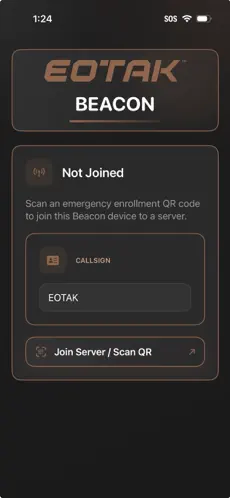
EOTAK Beacon on iOS, not yet joined, waiting for an emergency enrollment QR code with a callsign field
Platform
Android and iOS
Enrollment
QR code, no account
Position
GPS heartbeat
Needs
An EOTAK Server
01

How it works

Three steps, and the third one is the only one anybody else sees.

Scan and join

The operator scans an enrollment QR code from your EOTAK dashboard or EOTAK Stack app and gets a short-lived session in return. No account, no certificate bundle, nothing typed in.

Relay position

Beacon sends GPS heartbeats at an interval you set, through your server rather than straight at the network.

Appear in TAK

Each validated heartbeat becomes a Cursor on Target event on your TAK server. ATAK, iTAK and TAK Aware clients all see the operator as a live marker.

02

Inside the app

Five things it was built to do, and nothing it was not.

Heartbeat you setChoose how often position goes out, and trade precision against battery to match how the day is actually running.
Reports in the backgroundPosition keeps flowing with the phone locked or another app in front. Nobody has to keep Beacon open to stay on the map.
Holds what it cannot sendHeartbeats are buffered on the device when the network is unavailable and replayed automatically on reconnect, so a gap in coverage is a gap in the network and not a gap in the record.
Stays joinedThe session survives a restart, and is revalidated when the app comes back to the front. Nobody re-scans a code because their phone died.
911 alertA long press sends a 911 alert as a Cursor on Target event, with position, to every connected TAK client.
03

What it needs

Beacon never talks to TAK infrastructure directly. Enrollment and every heartbeat go through your EOTAK Server, which validates the session and posts the position on, so the secrets stay off the phone in somebody’s pocket.

An EOTAK ServerBeacon is a way onto a server you already run. It issues the enrollment codes and it is what Beacon reports to.
A network, some of the timeEnrollment and relay both need connectivity. Buffering covers the gaps in between, not the absence of a network altogether.
iOS 18 or lateriPhone or iPad. The Android build is not out yet.
EOTAK Beacon

One code,
and they are on.

Free on the App Store. Needs an EOTAK Server to report to.

Download on the App Store Get it on Google Play

CLARKSVILLE, TN · +1 (931) 266-0888